顯示具有 Selenium 標籤的文章。 顯示所有文章

Selenium + Python

Selenium 1 (Selenium RC)


How Selenium RC Works

First, we will describe how the components of Selenium RC operate and the role each plays in running your test scripts.

RC Components

Selenium RC components are:
  • The Selenium Server which launches and kills browsers, interprets and runs the Selenese commands passed from the test program, and acts as an HTTP proxy, intercepting and verifying HTTP messages passed between the browser and the AUT.
  • Client libraries which provide the interface between each programming language and the Selenium RC Server.
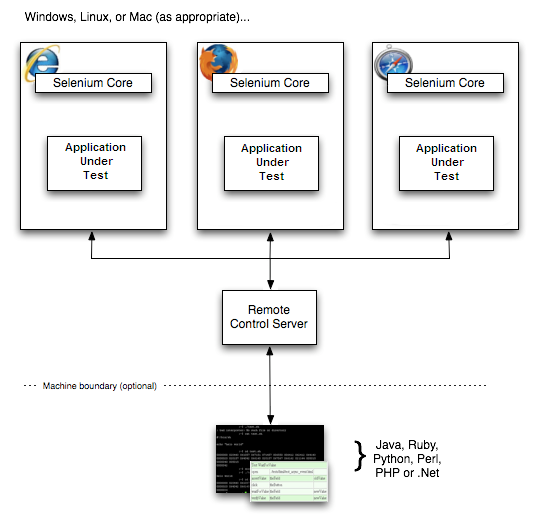
Here is a simplified architecture diagram....
_images/chapt5_img01_Architecture_Diagram_Simple.png

The diagram shows the client libraries communicate with the Server passing each Selenium command for execution. Then the server passes the Selenium command to the browser using Selenium-Core JavaScript commands. The browser, using its JavaScript interpreter, executes the Selenium command. This runs the Selenese action or verification you specified in your test script.

Selenium Server

Selenium Server receives Selenium commands from your test program, interprets them, and reports back to your program the results of running those tests.
The RC server bundles Selenium Core and automatically injects it into the browser. This occurs when your test program opens the browser (using a client library API function). Selenium-Core is a JavaScript program, actually a set of JavaScript functions which interprets and executes Selenese commands using the browser’s built-in JavaScript interpreter.
The Server receives the Selenese commands from your test program using simple HTTP GET/POST requests. This means you can use any programming language that can send HTTP requests to automate Selenium tests on the browser.

Client Libraries

The client libraries provide the programming support that allows you to run Selenium commands from a program of your own design. There is a different client library for each supported language.

Installation

Installation is rather a misnomer for Selenium. Selenium has a set of libraries available in the programming language of your choice.
Once you’ve chosen a language to work with, you simply need to:

  • Install the Selenium RC Server.
  • Set up a programming project using a language specific client driver.

Using the Python Client Driver

  • Install Selenium via PIP, instructions linked at SeleniumHQ downloads page
  • Either write your Selenium test in Python or export a script from Selenium-IDE to a python file.
  • Run Selenium server from the console
  • Execute your test from a console or your Python IDE
For details on Python client driver configuration, see the appendix Python Client Driver Configuration.

Selenium IDE 的使用


http://www.tad0616.net/modules/tad_book3/page.php?tbdsn=827


Selenium API 中文手册refer from : http://www.tad0616.net/modules/tad_book3/page.php?tbdsn=826

Commands (命令)

  • Action
    對目前狀態進行操作,失敗時,停止測試
  • Assertion
    檢驗是否有產生正確的值
  • Element Locators
    指定HTML中的某元素
  • Patterns
    用於模式匹配
1. Element Locators (元素定位器)
  • id=id
    id locator 指定HTML中的唯一id的元素
  • name=name
    name locator指定 HTML中相同name的元素中的第一個元素
  • identifier=id
    identifier locator 首先查找HTML是否存在該id的元素, 若不存在,查找第一個該name的元素
  • dom=javascriptExpression
    dom locator用JavaScript表達式來定位HTML中的元素,注意必須以"document"開頭
    例如:
    dom=document.forms['myForm'].myDropdown
    dom=document.images[56]
  • xpath=xpathExpression
    xpath locator用 XPath 表達式來定位HTML中的元素,注意必須以"//"開頭
    例如:
    xpath=//img[@alt='The image alt text']
    xpath=//table[@id='table1']//tr[4]/td[2]
  • link=textPattern
    link locator 用link來選擇HTML中的連接或元素
    例如:
    link=The link text
  • 在没有locator前序的情况下 Without a locator prefix, Selenium uses:
    如果以"document."開頭,則預設是使用 dom locator,如果是以"//"開頭,則預設使用xpath locator,其它情況下預設以 identifier locator
2. String Matching Patterns (字符串匹配模式)
  • glob:patthern
    glob模式,用萬用字元"*"代表任意長度的字元符號,"?"代表一個字元符號
  • regexp:regexp
    正規表達試模式,用JavaScript 正規表達式的現式來匹配字元符號字串
  • exact:string
    精確匹配模式,精確匹配整個字元符號字串,不能使用萬用字元
  • 在沒有指定字元符號字串匹配前序的時候,selenium預設使字golb匹配模式
3. Select Option Specifiers (Select選項指定器)
  • label=labelPattern
    透過匹配選項中的本文指定選項
    例如:label=regexp:^[Oo]ther
  • value=valuePattern
    透過匹配選項中的值指定選項
    例如:value=other
  • id=id
    透過匹配選項的id指定選項
    例如: id=option1
  • index=index
    透過匹配選項的序號指定選項,序號從0開始
    例如:index=2
  • 在沒有選項可選擇的前提的情況下,預設是匹配選項的本文

Actions

描述了字戶所會做出的操作。
Action 有兩種形式: action和actionAndWait, action會立即執行,而actionAndWait会假设需要较长时间才能得到该action的回應,而作出等待,open則是會自動處理等待時間。

  • click
    click(elementLocator)
    - 點擊連結,按钮,复选和单选框
    - 如果點擊後需要等待回應,则用"clickAndWait"
    - 如果是需要经過JavaScript的alert或confirm对话框后才能继续操作,则需要调用verify或assert来告诉Selenium你期望对对话框进行什么操作。
    click aCheckbox
    clickAndWait submitButton
    clickAndWait anyLink
  • open
    open(url)
    - 在浏览器中打开URL,可以接受相对和绝对路径两种形式
    - 注意:该URL必须在与浏览器相同的安全限定范围之内
    open /mypage
    open http://localhost/
  • type
    type(inputLocator, value)
    - 模拟人手的输入过程,往指定的input中输入值
    - 也适合给复选和单选框赋值
    - 在这个例子中,则只是给钩选了的复选框赋值,注意,而不是改写其文本
    type nameField John Smith
    typeAndWait textBoxThatSubmitsOnChange newValue
  • select
    select(dropDownLocator, optionSpecifier)
    - 根据optionSpecifier选项选择器来选择一个下拉菜单选项
    - 如果有多于一个选择器的时候,如在用通配符模式,如"f*b*",或者超过一个选项有相同的文本或值,则会选择第一个匹配到的值
    select  dropDown Australian Dollars
    select  dropDown index=0
    selectAndWait currencySelector value=AUD
    selectAndWait currencySelector label=Auslian D*rs
  •  goBack,close
    goBack()
    模拟点击浏览器的后退按钮
    close()
    模拟点击浏览器关闭按钮
  • selectWindow
    select(windowId)
    - 选择一个弹出窗口
    - 当选中那个窗口的时候,所有的命令将会转移到那窗口中执行
    selectWindow myPopupWindow
    selectWindow null
  • pause
    pause(millisenconds)
    - 根据指定时间暂停Selenium脚本执行
    - 常用在调试脚本或等待服务器段响应时
    pause 5000
    pause 2000
  • fireEvent
     fireEvent(elementLocatore,evenName)
    模拟页面元素事件被激活的处理动作
    fireEvent textField focus
    fireEvent dropDown blur
  • waitForCondition
    waitForCondition(JavaScriptSnippet,time)
    - 在限定时间内,等待一段JavaScript代码返回true值,超时则停止等待
    waitForCondition var value=selenium.getText("foo"); value.match(/bar/); 3000
  • waitForValue
    waitForValue(inputLocator, value)
    - 等待某input(如hidden input)被赋予某值,
    - 会轮流检测该值,所以要注意如果该值长时间一直不赋予该input该值的话,可能会导致阻塞
    waitForValue finishIndication isfinished
  • store,stroreValue
    store(valueToStore, variablename)
    保存一个值到变量里。
    该值可以由自其他变量组合而成或通过JavaScript表达式赋值给变量
    store Mr John Smith fullname
    store $.{title} $.{firstname} $.{suname} fullname
    store javascript.{Math.round(Math.PI*100)/100} PI
    storeValue inputLocator variableName
    把指定的input中的值保存到变量中
    storeValue userName userID
    type userName $.{userID}
  • storeText, storeAttribute
    storeText(elementLocator, variablename)
    把指定元素的文本值赋予给变量
    storeText currentDate expectedStartDate
    verifyValue startDate $.{expectedStartDate}
    storeAttribute(.{}elementLocator@attributeName,variableName.{})
    把指定元素的属性的值赋予给变量

    storeAttribute input1@class  classOfInput1
    verifyAttribute input2@class $.{classOfInput1}
  • chooseCancel.., answer..
    chooseCancelOnNextConfirmation()
    - 当下次JavaScript弹出confirm对话框的时候,让selenium选择Cancel
    - 如果没有该命令时,遇到confirm对话框Selenium默认返回true,如手动选择OK按钮一样
    chooseCancelOnNextConfirmation 
    - 如果已经运行过该命令,当下一次又有confirm对话框出现时,也会同样地再次选择Cancel
    answerOnNextPrompt(answerString)
    - 在下次JavaScript弹出prompt提示框时,赋予其anweerString的值,并选择确定

    answerOnNextPrompt Kangaroo

Assertions

允許用戶去檢查目前狀態。兩種模式:Assert 和verify,當Assert失敗,則退出測試,當verify失則,測會繼續運行。
  • assertLocation, assertTitle
    assertLocation(relativeLocation)
    判斷目前是在正確的頁面
    verifyLocation /mypage
    assertLocation /mypage
  • assertTitle(titlePattern)
    檢查目前的頁面 title是否正確
    verifyTitle My Page
    assertTitle My Page
  • assertValue
    assertValue(inputLocator, valuePattern)
    - 檢查input的值
    - 對於 checkbox或radio,如果已選擇,則值為"on",反之为"off"
    verifyValue nameField John Smith
    assertValue document.forms[2].nameField John Smith
  • assertSelected, assertSelectedOptions
    assertSelected(selectLocator, optionSpecifier)
    检查select的下拉菜单中选中的选型是否和optionSpecifer(Select选择选项器)的选项相同
    verifySelected dropdown2 John Smith
    verifySelected dorpdown2 value=js*123
    assertSelected document.forms[2].dropDown label=J*Smith
    assertSelected document.forms[2].dropDown index=0
  • assertSelectOptions(selectLocator, optionLabelList)
    - 检查下拉菜单中的选项的文本是否和optionLabelList相同
    - optionLabelList是以逗号分割的一个字符串
    verifySelectOptions dropdown2 John Smith,Dave Bird
    assertSelectOptions document.forms[2].dropdown Smith,J,Bird,D
  • assertText
    assertText(elementLocator,textPattern)
    - 检查指定元素的文本
    - 只对有包含文本的元素生效
    - 对于Mozilla类型的浏览器,用textContent取元素的文本,对于IE类型的浏览器,用innerText取元素文本
    verifyText statusMessage Successful
    assertText //div[@id='foo']//h1 Successful
  • assertTextPresent, assertAttribute
    assertTextPresent(text)
    检查在当前给用户显示的页面上是否有出现指定的文本
    verifyTextPresent You are now logged in
    assertTextPresent You are now logged in
  • assertAttribute(.{}elementLocator@attributeName.{}, ValuePattern)
    检查当前指定元素的属性的值
    verifyAttribute txt1@class bigAndBlod
    assertAttribute document.images[0]@alt alt-text
    verifyAttribute //img[@id='foo']/alt alt-text
  • assertTextPresent, etc.
    assertTextPresent(text)
    assertTextNotPresent(text)
    assertElementPresent(elementLocator)
    verifyElementPresent submitButton  
    assertElementPresent //img[@alt='foo']   assertElementNotPresent(elementLocator)
  • assertTable
    assertTable(cellAddress, valuePattern)
    - 检查table里的某个cell中的值
    - cellAddress的语法是tableName.row.column, 注意行列序号都是从0开始
    verifyTable myTable.1.6 Submitted
    assertTable results0.2 13
  • assertVisible, nonVisible
    assertVisible(elementLocator)
    - 检查指定的元素是否可视的
    - 隐藏一个元素可以用设置css的'visibility'属性为'hidden',也可以设置'display'属性为'none'
    verfyVisible postcode
    assertVisible postcode
  • assertNotVisible(elementLocator)
    verfyNotVisible postcode  
    assertNotVisible postcode  
  • Editable, non-editable
    assertEditable(inputLocator)
    检查指定的input是否可以编辑
    verifyEditable shape
    assertEditable colour
  • assertNotEditable(inputLocator)
    检查指定的input是否不可以编辑
  • assertAlert
    assertAlert(messagePattern)
    - 检查JavaScript是否有产生带指定message的alert对话框
    - alert产生的顺序必须与检查的顺序一致
    - 检查alert时会产生与手动点击'OK'按钮一样的效果。如果一个alert产生了,而你却没有去检查它,selenium会在下个action中报错。
    - 注意:Selenium 不支持 JavaScript 在onload()事件时 调用alert();在这种情况下,Selenium需要你自己手动来点击OK.
  • assertConfirmation
    assertConfirmation(messagePattern)
    - 检查JavaScript是否有产生带指定message的confirmation对话框和alert情况一样,confirmation对话框也必须在它们产生的时候进行检查
    - 默认情况下,Selenium会让confirm() 返回true, 相当于手动点击Ok按钮的效果。你能够通过chooseCancelOnNextConfirmation命令让confirm()返回false.同样 地,如果一个cofirmation对话框出现了,但你却没有检查的话,Selenium将会在下个action中报错
    - 注意:在Selenium的环境下,confirmation对话框框将不会再出现弹出显式对话框
    - 注意:Selenium不支持在onload()事件时调用confirmation对话框,在这种情况下,会出现显示confirmatioin对话框,并需要你自己手动点击。
  • assertPrompt
    assertPrompt(messagePattern)
    - 检查JavaScript是否有产生带指定message的Prompt对话框
    - 你检查的prompt的顺序Prompt对话框产生的顺序必须相同
    - 必须在verifyPrompt之前调用answerOnNextPrompt命令
    - 如果prompt对话框出现了但你却没有检查,则Selenium会在下个action中报错
    answerOnNextPrompt Joe
    click id=delegate
    verifyPrompt Delegate to who?

Parameters and Variables

参数和变量的声明范围由简单的赋值到JavaScript表达式赋值。
Store,storeValue 和storeText 为下次访问保存值。
在Selenium内部是用一个叫storeVars的map来保存变量名。

  • Variable Substitution 变量替换
    提供了一个简单的方法去访问变量,语法 $.{xxx}
    store Mr title
    storeValue nameField surname
    store $.{title} $.{suname} fullname
    type textElement Full name is: $.{fullname}
  • JavaScript Evaluation JavaScript赋值
    你能用JavaScript来构建任何你所需要的值。
    这个参数是以javascript开头,语法是 javascript.{'with a trailing'}。
    可以通过JavaScript表达式给某元素赋值。
    store javascript.{'merchant'+(new Date()).getTime()} merchantId
    type textElement javascript.{storedVars['merchantId'].toUpperCase()}